What are those things give me শান্তি?
A green pipeline, an email that actually arrives, and six failures that taught me more than any tutorial
 Saidul Islam Rajib
Jul 30, 2026 · 9 min read · 403 views
What Gives Me Shanti?
Shanti — শান্তি.
Not the absence of work. The absence of dread. The specific quiet that arrives when the Stage View turns green all the way across, and you know it will still be green tomorrow.
I spent far longer wiring up deployment for this mess-management app than I spent writing it. That sounds like failure. It wasn't. Building the app was typing. This was learning.
Here is what actually broke, in the order it broke, and what each one taught me.
1. The email that was never sent, and said it was
Members register, get a link, set a password. Simple. Except nobody got an email.
The registration page cheerfully said "Check your email for a link to create your password."
No error. No warning. Nothing in the logs. The API returned 201.
The mailer looked like this:
export async function sendMail(message: MailMessage): Promise<MailResult> {
  if (!isMailConfigured()) {
    return { ok: true, delivered: false, preview: message.text };
  }
  ...
}
And the caller checked this:
if (!delivery.ok) {
  body.emailSent = false;
}
ok: true. Every time. Because ok meant nothing threw — not the mail went out. The one
field that carried the truth, delivered, was never read.
I had no SMTP configured at all. The function returned success for a message it never
attempted to send, and the UI faithfully relayed that success to every single person who
signed up.
The lesson: a boolean called ok is a lie waiting to happen. Name the thing you actually
mean. delivered is a fact. ok is a mood.
The fix was one line, and it changed the failure from invisible to obvious:
const delivered = delivery.ok && delivery.delivered;2. SPF: the record that only covered half the job
I went with Cloudflare Email Routing plus Gmail, because both are free.
Cloudflare enables Email Routing, adds your MX records, and helpfully creates an SPF record:
v=spf1 include:_spf.mx.cloudflare.net ~allLooks complete. It isn't. Cloudflare Email Routing only receives. It has no outbound SMTP
at all. My mail was leaving through Google's servers, which that record does not authorise.
Receiving worked perfectly, so nothing looked wrong. Outbound mail was quietly failing SPF and
heading for spam folders.
v=spf1 include:_spf.mx.cloudflare.net include:_spf.google.com ~allOne record. Both includes. Never two SPF records — that's a permanent error, worse than having
none.
There's a second trap stacked on the first: Cloudflare locks the DNS records it manages, so
the DNS editor won't let you touch that TXT record until you unlock them.
The lesson: "it works" is not the same as "it works in both directions." I had tested
receiving. I had not tested sending, because sending appeared to work — see failure #1.
3. I locked myself out of my own server
One morning: ssh: connect to host 54.251.180.71 port 22: Connection timed out.
The site was up. Port 443 answered. Only SSH was dead.
The security group allowed SSH from exactly one address — my home IP from the day I ranterraform apply. My ISP had since moved me to an entirely different range.
Easy fix, I thought. Add my current IP. So I looked it up with an HTTPS call, added that /32,
and… still timed out.
Here's the part that cost me an hour. My public IP depended on the protocol:
| How I checked | What it reported |
|---|---|
| HTTPS API lookup | 103.187.94.135 |
| Raw TCP (an SMTP handshake) | 103.187.94.132 |
| Raw TCP again, minutes later | 103.187.94.131 |
The HTTPS lookup was returning my corporate web proxy's address — an address my SSH traffic
never touched. And the raw TCP address was rotating, because carrier-grade NAT hands you a
different address from a pool whenever it feels like it.
A /32 rule was never going to work. I allowlisted the /24.
The lesson: "what's my IP" websites tell you the IP of that request, over that protocol,
at that moment. If you're allowlisting for SSH, find out what your SSH traffic looks like from
the outside — not what your browser looks like.
Also worth knowing: a timeout means packets are being dropped (firewall). Connection
refused means you reached the host and nothing was listening. Those two words point at
completely different problems, and I'd been treating them as the same.
4. The rollout that succeeded and did nothing
Email configured. Secret patched. Deployments restarted:
deployment.apps/bachelor-point-blue restarted
deployment.apps/bachelor-point-green restarted
Still no email in production.
The pods told the story:
bachelor-point-blue-798f6d77b7-q5tzd 1/1 Running 0 6h49mSix hours and forty-nine minutes. Nothing had restarted. kubectl rollout restart had
reported success and changed nothing observable.
It had created new ReplicaSets. Those ReplicaSets had been failing, silently, for four minutes:
Error creating: pods "bachelor-point-blue-c8bd868f4-lx26r" is forbidden:
exceeded quota: bachelor-point-quota,
requested: limits.cpu=800m, used: limits.cpu=1900m, limited: limits.cpu=2
A ResourceQuota capped CPU limits at 2000m. Blue (800m) + green (800m) + caddy (300m) = 1900m.
The deployment strategy was maxSurge: 1 — create the new pod before removing the old one —
which needed another 800m. 2700m > 2000m. Refused.
The root cause was drift. My overlay declared green as replicas: 0; green was running. It was
the standby colour, serving nobody, holding 800m hostage.
The lesson: kubectl rollout restart returning happily means the annotation was patched,
not the pods came back. rollout status is what tells you the truth. And on a small node,maxSurge: 1 is a promise you may not be able to keep.
5. The pipeline that failed in 232 milliseconds
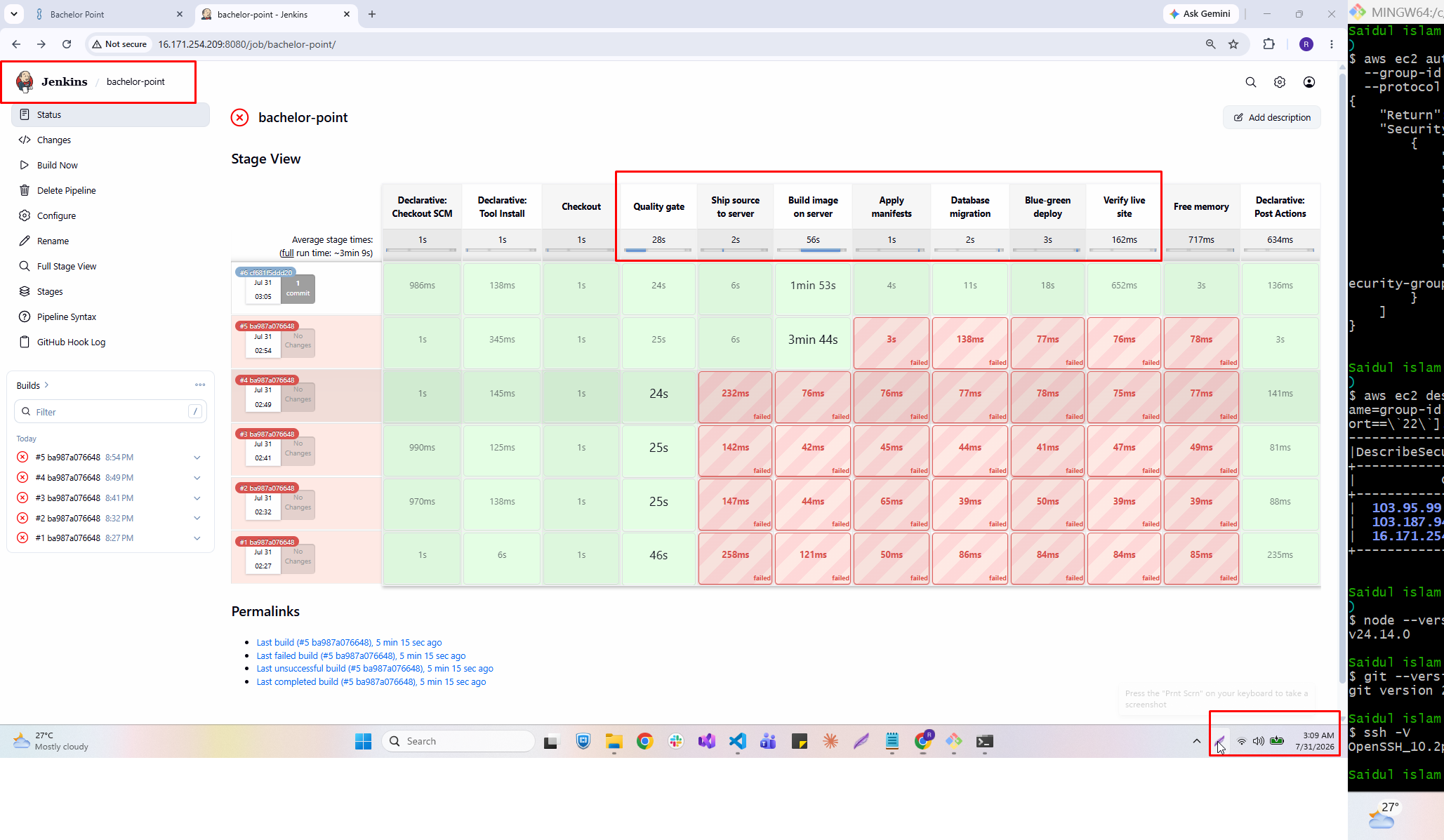
Jenkins, five red builds, all dying at "Ship source to server."
The duration was the clue: 232ms. An SSH connection takes seconds. A blocked one takes
fifteen. Failing in a fifth of a second means it never opened a socket. I confirmed it from the
other side — the server's auth.log had no connection attempts at all.
The stage log showed only this, which is not an error message:
Use a tool from a predefined Tool Installation -- node20
Fetches the environment variables for a given tool...
The actual answer was buried at the bottom of the raw console output:
java.lang.NoSuchMethodError: No such DSL method 'sshagent' found among steps [...]The SSH Agent plugin wasn't installed. sshagent isn't built into Jenkins. Groovy hit an
unknown method and died instantly.
Along the way the pipeline also taught me:
- A private repo needs a Personal Access Token, not a password. GitHub dropped password auth
for Git in 2021. The error says "Invalid username or token" even when you supplied neither. - Adding a credential in Jenkins does not select it. The dropdown stays on
- none -and
the error stays red, and you sit there wondering why. - The NodeJS tool lets Jenkins install Node per-build, so you never need shell access to the
controller. The version dropdown defaults to the newest release — which is not the version
in your Dockerfile.
The lesson: the Stage View shows step descriptions. Errors live in /consoleText. I lost
an hour reading a panel that was never going to tell me anything.
6. The placeholder that shipped
The Apply manifests stage failed in 3 seconds:
sed -i 's|REPLACE_WITH_INGRESS_HOST|...|g' k8s/free-tier/ingress.yaml && kubectl apply -k ...k8s/free-tier/ingress.yaml did not exist. It never had. The free-tier overlay uses Caddy, not
an ingress — that line was copy-pasted from the production variant. sed exited non-zero, &&
short-circuited, and kubectl apply never ran.
Worse was what I found while fixing it. kubectl apply -k renders the base manifests verbatim,
including:
image: REPLACE_IMAGEThat would have been applied to the live deployment as a literal image name. Kubernetes would
have dutifully started rolling out to an image that cannot exist, burning quota on a pod stuck
in ImagePullBackOff.
The migrate stage in the same file already did it correctly — render, substitute, then apply:
kubectl kustomize k8s/free-tier/ | sed 's|REPLACE_IMAGE|...|g' | kubectl apply -f -The lesson: placeholders that look like config are landmines. REPLACE_IMAGE is valid YAML
and a valid string. Nothing rejects it until it's live.
7. The one I'm least proud of
I put a real Google App Password into k8s/base/secret.example.yaml — a file tracked by git —
and committed it. It reached three branches, including main, before I noticed.
The repo is private, which limits the damage. It doesn't undo it. A secret in git history is in
every clone, every backup, every CI checkout, and it stays there if the repo ever goes public.
Editing the file doesn't help; the value lives in the commit.
The lesson: files named *.example.* exist precisely so you can commit them. That's what
makes them dangerous. The only real remedy is rotation, and the only real prevention is never
typing a live credential into a tracked file — not once, not "just to test."
So, what gives me shanti?
Not the absence of problems. I collected six in a week, and I caused most of them.
Shanti is the moment a failure starts telling the truth.
Every one of these hid behind a lie:
ok: truefor an email that was never sent- An SPF record that was complete for receiving and useless for sending
- An IP lookup that answered honestly about the wrong protocol
restartedfor pods that never moved- A green "success" from a
rollout restartthat had already given up - A
sedon a file that hasn't existed for the entire life of the repository
The work was never fixing them. Each fix was a line or two. The work was getting the system to
say what was actually wrong — reading /consoleText instead of the pretty panel, checking pod
age instead of pod status, noticing 232ms was too fast to be a network call, querying DNS
directly instead of trusting a dashboard.
That's the skill. Not knowing Kubernetes. Not knowing Jenkins. Knowing how to make a silent
system confess.
And then, finally:
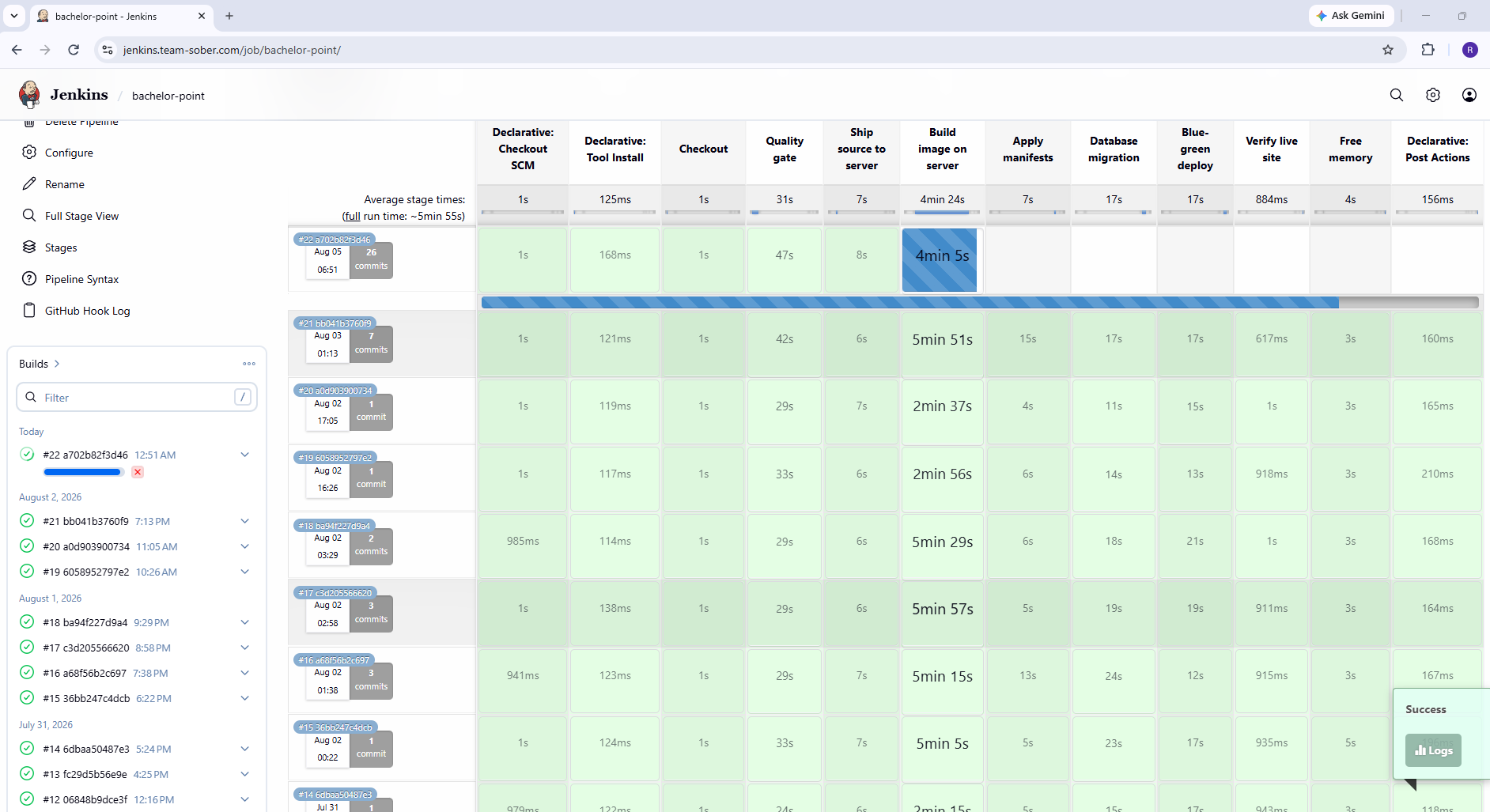
Finished: SUCCESSGreen across every stage. An email in my inbox from admin@team-sober.com. A blue-green switch
that flipped without anybody noticing.
That's shanti. Not because it's done — there's an App Password to rotate, an SPF record to
finish, a Terraform config that keeps eating its own security group rule. But because when the
next thing breaks, I'll know how to make it talk.
Stack: Next.js 14 · Prisma · SQL Server · k3s on a single t3.small · Jenkins · Terraform ·
Cloudflare · AWS ap-southeast-1. Total hosting cost: free tier.
No comments yet.
Sign in to leave a comment.